Translate

Samstag, 6. Juni 2026

ORDS Problem auf Oracle Cloud ADB (weltweit) - /i/ images werden nicht richtig angezeigt - SOLVED


Auf meiner APEX Instanz auf xyz.adb.eu-frankfurt-1.oracelcloudapps.com wird Folgendes angezeigt:

There is a problem with your environment because the Oracle APEX files have not been loaded. Please verify that you have copied the images directory to your application server as instructed in the Installation Guide. In addition, please verify that your image prefix path is correct. Your current path is /i/24.2.17/ (it should contain both starting and ending forward slashes, such as the default /i/). Use the SQL script reset_image_prefix.sql if you need to change it.

Bei Oracle Cloud ADB (Frankfurt) zeigt mir bei DB Actions das Launch Pad an:  

Warnung

Nichtübereinstimmende Version
Die ORDS-Ausführungsversion und die in der Datenbank installierten ORDS-Versionen sind nicht identisch. Einige Funktionen sind möglicherweise deaktiviert.

From the APEX Discussion Forum entry:

Running this in SQL WEB with ADMIN resolved the issue:

begin
apex_instance_admin.set_parameter(
p_parameter => 'IMAGE_PREFIX'
, p_value => 'https://static.oracle.com/cdn/apex/24.2.17/'
);
commit;
end;


That solved my issue....

Great thanks to Rami Jahan !!!

Just to let you know....

Donnerstag, 2. Oktober 2025

APEX Calendar - vertikale Schrift mit Feiertagen

 Kürzlich habe ich (mit Hilfe ChatGPT) dieses hier realisiert:

Die Feiertage (auf meiner P12) tauchen im Kalender als vertikale Einträge auf.

Sieht so easy aus.... aber ist nicht trivial... aber machbar... wie folgt:

Mein SQL für den Kalender sieht so aus für Platz 1 (Region):
(PS: für 4 Plätze habe ich 4 Regionen untereinander oder nebeneinander...)

select ID,
    case 
    when partner is null then name||'<br>'||Gastspieler
    else name||'<br>'||partner
    end anzeige,
       TAG,
       TAG_BIS,
       PLATZ,
    case 
    when type='Manschaftstraining' then 'apex-cal-cal-green' --'apex-cal-green' 
    when type ='Buchung' and BALLMASCHINE = 'Y'  then 'apex-cal-red' 
    when type ='Buchung' and GASTSPIELGEBUEHR = 10  then 'apex-cal-gray'
    when type='Buchung'      then 'apex-cal-cyan' -- cyan ist gut hellgrün
    when type='Punktspiel'   then 'apex-cal-orange'
    when type='Training'     then 'apex-cal-lime'
    when type='gesperrt'     then 'apex-cal-black' 
    when type='Feiertag'     then 'apex-cal-yellow'
  end as css_farbe,
  BEMERKUNGEN
  from TENNIS_BOOKING_TAG
where PLATZ = 1

Nun zu den "Feiertagen":

1. Dazu benötige ich zunächst eine Tabelle mit den Feiertagen..."vc_holidays_de" (ID, Name, Datum)

2. dann einen Before_Header pl/sql Process "get_holidays_de" der füllt :P12_Holidays_json mit dem Namen des Feiertags:

declare

  l_json clob := '[';
  l_cnt  integer := 0;
begin
  for rec in (
    select to_char(holiday_date, 'YYYY-MM-DD') as holiday_date,
           name
      from vc_holidays_de
     where holiday_date between trunc(sysdate, 'YYYY') and trunc(sysdate + 365)
  )
  loop
    if l_cnt > 0 then
      l_json := l_json || ',';
    end if;
    l_json := l_json || json_object(
      'date' value rec.holiday_date,
      'name' value rec.name
    );
    l_cnt := l_cnt + 1;
  end loop;
  l_json := l_json || ']';
  :P12_HOLIDAYS_JSON := l_json;
end;


3. Platz 1 - Region --> Attributes --> JS initialisation options :

ein Javascript auf P12 fügt den Namen ein (siehe im 2. Screenshot ganz unten):

JS Code:

function(pOptions) {

  return getCalendarOptions("PLATZ1", "P12_HOLIDAYS_JSON", pOptions);

}


das ist aber noch nicht alles.... jetzt zum CSS... und der vertikalen Darstellung:

Das folgende CSS rufe ich durch 
#WORKSPACE_FILES#holidays.css auf der Seite 12 auf bei den Page Attributes unter CCS, files/URL auf 

und habe es vorher als Workspace_file bei den Shared Components gespeichert.
Es sieht so aus:

.fc .fc-holiday {
    background-color: #e0e0e0 !important; /* light grey for holidays */
}
.fc .fc-weekend {
    background-color: #f0f0f0 !important;
}
.fc .fc-holiday-label {
  font-size: 14px;
  color: #a00;
  writing-mode: vertical-rl; /* vertical text */
  transform: rotate(180deg); /* read from top to bottom */
  position: absolute;
  top: 22px;
  left: 5px;
  z-index: 10;
  background-color: rgba(255, 255, 255, 0.7);
  padding: 2px;
  border-radius: 3px;
  max-height: 200px;
  overflow: hidden;
}
.fc .fc-daygrid-day-frame,
.fc .fc-timegrid-slot,
.fc .fc-day {
  position: relative;
}

Der Vollständigkeit halber:

Auch braucht man für den FULLCALENDAR diesen Eintrag auf Page-Level bei Javascript URL:
#WORKSPACE_FILES#fullcalendar_options.js

Die leicht angepasste Standard-Datei in den Shared Compoments sieht so aus:

function getCalendarOptions(regionId, holidaysItemId, pOptions) {
  // Load holidays JSON from page item
  const raw = $v(holidaysItemId);
  let holidays = [];
  try {
    holidays = JSON.parse(raw);
  } catch (e) {
    console.warn('Could not parse holidays JSON:', e);
  }
  // Modify existing pOptions IN-PLACE
  pOptions.locale = 'de';
  pOptions.initialView = 'timeGridWeek';
  pOptions.slotMinTime = "07:00:00";
  pOptions.slotMaxTime = "22:00:00";
  pOptions.expandRows = true;
  pOptions.height = '100%';
  pOptions.slotDuration = "01:00:00";
  pOptions.dayHeaderFormat = { weekday: 'short', month: 'numeric', day: 'numeric' };
  pOptions.titleFormat = { day: 'numeric', month: 'numeric', year: 'numeric' };
  pOptions.weekNumbers = false;
  pOptions.weekNumberCalculation = 'ISO';
  pOptions.displayEventTime = true;
  pOptions.displayEventEnd = true;
  pOptions.allDaySlot = false;
  pOptions.disableKeyboardSupport = true;
  pOptions.windowResize = null;
  pOptions.slotLabelFormat = { hour: '2-digit', minute: '2-digit', hour12: false };
  pOptions.eventTimeFormat = { hour: '2-digit', minute: '2-digit', hour12: false };
  pOptions.dayCellDidMount = function (info) {
    const day = info.date.getDay();
    // Style weekends
    if (day === 0 || day === 6) {
      info.el.classList.add('fc-weekend');
    }
    // Format date YYYY-MM-DD
    const dateStr = info.date.getFullYear() + '-' +
      String(info.date.getMonth() + 1).padStart(2, '0') + '-' +
      String(info.date.getDate()).padStart(2, '0');
    const holiday = holidays.find(h => h.date === dateStr);
    if (holiday) {
      info.el.classList.add('fc-holiday');
      if (
        info.view.type === 'timeGridWeek' &&
        info.el.classList.contains('fc-timegrid-col')
      ) {
        const label = document.createElement('div');
        label.className = 'fc-holiday-label';
        label.textContent = holiday.name;
        info.el.prepend(label);
      }
    }
  };
  return pOptions;
}

Viel Erfolg bei der Umsetzung!

Donnerstag, 24. Oktober 2024

ZUGFeRD - xRechnung - development status - any idea on PDF/A3 (PDF and xml-file)

 ZUGFeRD - schonmal gehört ? (digitale Rechnung für B2B)

ab 1.1.2025 Pflicht für Unternehmen (und teilweise auch Vereine).

Erklärung:
ZUGFeRD (=Zentraler User Guide des Forums elektronische Rechnung Deutschland) ist ein einheitliches Datenformat für elektronische Rechnungen und wird seit 25.06.2017 allen interessierten Unternehmen und Behörden kostenlos zur Verfügung gestellt.
ZUGFeRD basiert auf PDF/A-3 und bietet die Möglichkeit, eine XML-Rechnung in ein PDF einzubetten und dadurch sowohl strukturierte Rechnungsdaten (XML) als auch das Rechnungsbild (PDF) gleichzeitig per E-Mail zu übermitteln.
Durch PDF/A-3 wird die Unveränderbarkeit der Daten sichergestellt und die empfangenen strukturierten Daten können ohne weitere Bearbeitung, wie z.B. das Einscannen einer „normalen“ PDF-Rechnung, ausgelesen und automatisiert weiterverarbeitet werden.
Quelle: 
https://www.truecommerce.com/de/faq/zugferd/

Als APEX Entwickler habe ich mich (für meinen Sportverein) nun daran gemacht, dieses umzusetzen. 

Ich bin mit der Entwicklung mittlerweile soweit:
- eine (eingehende) xml-Rechnung einlesen (und in APEX im Formular darstellen) - als auch
- eine (ausgehende) generieren (wenn auch noch nicht mit allen Segmenten/Elementen)...
aber ich bin dran... mittels pl/sql Procedure und XMLSERIALIZE und XMLelement etc. das Prinzip habe ich verstanden...
jetzt ist es noch Sisyphus-Arbeit. Alles im ZUGFeRD-Format.

Das langfristige Ziel soll sein:
A) xml-Rechnung empfangen, in der Buchhaltung verbuchen und archivieren
B) Rechnung erstellen, als xml generieren und als PDF/A3 mailen und archivieren

Ab 1.1.2025 müssen Unternehmen - auch Vereine (teilweise) - in der Lage sein, xml-Rechnungen zu empfangen und einzulesen
siehe: https://lsb-niedersachsen.vibss.de/vereinsmanagement/aktuelles/detail/elektronische-rechnungen
Achtung: Auch gemeinnützige Vereine gelten als Unternehmen, wenn sie nicht ausschließlich im ideellen Bereich tätig sind.

Wenn meine Procedures/Packages soweit stabil und leidlich vollständig sind, packe ich die mal auf Github.

Frage in die Runde:
Hat eine/r Lust sich an der Entwicklung zu beteiligen ? 
Speziell zum Thema PDF/A3-erstellen ist noch einiges offen...

Aktuell könnte ich lediglich PDF (mit Jasper Reports) und die Rechnung.xml separat von einander erstellen und per Email versenden (aus APEX)... aber das ist nur die halbe Miete.

Meldet Euch gerne bei mir (bernhard at fischer-wasels.de)

Montag, 7. Oktober 2024

I still miss Joel #JoelKallmanDay

 Am 16. Oktober ist wieder "Joel Kallman Day" und wir sollten ihm alle gedenken.

Joel ist leider Opfer von Covid19 geworden und verstorben.

Als ehemaliger Oracle Mitarbeiter (15 Jahre) und APEX Enthusiast traf ich Joel bei mehreren Konferenzen (hauptsächlich DOAG) - er unterstützte aber auch meine HTMLDB/APEX Workshops, die ich deutschlandweit hielt.
Meine vermeintlich letzte Chance ihn zu treffen war in 2017, als ich mit meiner Familie die Ostküste bereiste (von New York nach Miami...) und 5 Tage in den Blue Ridge Mountains bei Burnsville (Mt.Mitchell), North Carolina weilte... bis nach Ohio wäre es nicht weit gewesen... Aber Joel war schon wieder aktiv auf einer Konferenz in LA. So war er.

Ich hätte ihn gerne in seiner Heimat besucht und getroffen.

Joel war ein Musterbeispiel an "Community Leader" und gegenüber jedem hilfsbereit, offen und speziell "seiner" APEX community sehr zugewandt.

Gott habe ihn seelig. #JoelKallmanDay


 (eins von vielen...) Joels APEX introduction video und wie APEX in der Covid-19 Pandemie ein USA-weiter Helfer für die Krankenhäuser wurde


Freitag, 2. Juni 2023

Interactive Grid - customize Toolbar - add button und actions

Auch wenn es ein Crossposting ist...  möchte ich diese tolle Anleitung und Erklärung der GRID Funktionen rund um den Toolbar kurz hier erwähnen...

Link : https://tm-apex.hashnode.dev/customize-your-toolbar-interactive-grid-9

Danke an Timo Herwix....

Donnerstag, 2. Februar 2023

Es lohnt sich, Ideen beim APEX-Development einzubringen:


Oracle APEX Ideas & Feature Requests


Mal sehen, was hieraus wird... Bitte Voten !!!! (;-)

FR-2958: APEX_SUCCESS_MESSAGE to fade/dismiss after 3-5 secs - Oracle APEX


aktuell (Apex 22.1) funktioniert es hiermit:
apex.jQuery(function() {
  apex.theme42.util.configAPEXMsgs({
    autoDismiss: true,
    duration: 3000  // duration is optional (Default is 3000 milliseconds)
  });
});
--> Page attributes --> "execute when page loads"

Donnerstag, 10. März 2022

Label of Item alignment LEFT

Oracle APEX (since 5.0) comes with default settings for the labels of items "RIGHT" which looks like:

For several items on a page there is ample space wasted... and to my opinion labels aligned LEFT looks much more "in order"....

How to fix?

Go to "Region" settings -->
Appearance

Template: Standard

Template Options: Advanced --> Lable aligned: LEFT

and all lables of the items are nicely order left...

That's the trick.

Before:


After:


Good luck ! [ nächstes Mal wieder in DE]

And . . . . . . 

You can set this in your Region template!
How to ?

Go to Shared Components
pick: Templates
search for "Region" (templates) and copy "Standard" using the copy icon in the most right column and
name it: "Standard_labels_left" -
Create your new template.
Then search for it again and edit it (click on "Standard_labels_left") and you will see:


Now you can switch from "right" to "left" easily - and apply changes.


Whenever you have a form and like the labels to be aligned "LEFT", just assign this template to your region.

my 2 cents.

Donnerstag, 17. Februar 2022

Play beep sound

APEX 21.2 

Für die Bestätigung eines Befehles habe ich gerade mit einem "Beep-Sound" experimentiert, den ich als "Bestätigungs-Ton" nutzen möchte.

Hier meine APEX-Lösung:

1. "Beep-Sound" als "wav-Datei" runterladen... (von: https://www.soundjay.com/beep-sounds-1.html)

2. Die Datei "beep-02.wav" in Shared Components" als "application file" hochladen

3. -- > #APP_FILES#beep-02.wav

4. Seite erstellen mit einer Region namens "Region für Sound"
und einem Button namentlich "Play sound"...

5. Bei den Seitenattributen unter "Page HTML Body Attribute" einfügen: 

<script>
$('<audio id="chatAudio">
<source src="#APP_FILES#beep-02.wav" type="audio/wav">
</audio>')
</script>

6. Dynamic Action bei "Click" anlegen mit Namen: "sound"
    when: click
    selection type: button
    Button: Play_sound

7. "add True action" vom Typ "Execute Javascript Code" und bei

settings/code:     $('#chatAudio')[0].play();  

Referenz: https://stackoverflow.com/a/29517759

Danke an Okwo Moses !!! 

Der exakte Usecase folgt....

Viel Spaß damit !


Donnerstag, 9. September 2021

Interactive Report - resize image the smart way...

 I just came across a smart tipp how to resize (not compress) an image of a BLOB in an IR.

In the page properties under CSS- inline 

just put

img {

width: 100px;

height: 100px;

}

and adjust the pixel size and you are done:


thanks to Rex Araya https://apex.rexaraya.com/resize-image-in-apex-interactive-report/

and "Learning a'peks"

Dienstag, 17. August 2021

APEX - Render PDF in Region

 sorry for crossposting - but this one is worth mentioning:

Thanks to Vinish Kapoor and his detailed post on rendering a pdf or image in a static region.

This is a working example for APEX 21.1 (not tested on other versions)

The steps in short:

1. have a table (my_table) with a blob column and mimetype column - and id ofcourse...

2. create an application process (in shared components) of type AJAX callback

DECLARE
  vBlob blob;
  vmimetype varchar2(50);
BEGIN
  SELECT BLOB_column, mimetype_column INTO vBlob, vmimetype
                FROM my_table
                WHERE ID = V('P3_ID');
                 
  owa_util.mime_header(vmimetype,false);
  htp.p('Content-Length: ' || dbms_lob.getlength(vBlob)); 
  owa_util.http_header_close;  
  wpg_docload.download_file(vBlob);
  exception 
  when no_data_found then
   null;
END;

3. create a page with a region type static content and insert this:

<p align="center">
<iframe src="f?p=&APP_ID.:0:&SESSION.:APPLICATION_PROCESS=display_blob:NO:P3_ID,&P3_ID." width="99%" height="1000">
</iframe>
</p>
Note: contrary to Vinishs example 
I had to delete one " : " between NO and :P3_ID... (as shown above)
4. for my purpose I created a 2nd region of type IR or 
classic report and put a link on one of the columns to 
point to the same page 3 ... and defined a hidden item 
named P3_ID.
So as you can see from the above the APEX-URL calls 
the APPLICATION_PROCESS "display_blob" and passes 
the ID from the page to the process... which in turn 
renders the pdf within the iFrame.
I put the report on the left side of the page and 
the 2nd region aside of it.
Have fun and thanks to Vinish again! Great job !

Mittwoch, 31. März 2021

APEX PLUGIN Tutorial von Ronnie Weiss - sehr empfehlenswert !

Danke an Ronnie Weiss für sein akribisch erstelltes APEX Plugin Tutorial

Mit Anleitungs-Video und Beispiel-Code in jedem Tutorial.

Total cool ! Dauert ca. 2 Stunden zum Mitmachen. 

Mein Ergebnis seht Ihr hier: (Link zur Seite in der Oracle cloud


Ronnie ist übrigens ein eifriger APEX Plugin Entwickler. Seine sehr hilfreichen mittlerweile 29 Plugins sind auf APEX.WORLD unter Plugins zu finden.

Noch besser: es gibt zu seinen Plugins eine Demo-Anwendung, die man auch runterladen und zum Ausprobieren auf seinem eigenen Workspace installieren kann.

APEX-CHARTS - ein interessantes js-feature

Nach einem Plugin-Tutorial von Ronnie Weiss (2 Stunden beim Mitmachen... sehr empfehlenswert!) kam ich zufällig auf die APEXCHARTS - Javascript library apexcharts.js

Auf dieser Seite findet Ihr die ausführlich APEXCHARTS.com Dokumentation.


Donnerstag, 4. März 2021

Jasper Reports Studio 6.16 - tipps

We are presently extensively using Jasper Reports Studio 6.16 and JR Server installed at Maxapex.

Insert SYSDATE in report:

1. define a variable
2. enter in "expression" : new SimpleDateFormat("dd/MM/yy").format(new Date())
3. put the variable as a field on the report

or try to insert from the "Current Date" from the "Composite Elements" (right hand).

a textfiled will be generated [new java.util.Date()] and the standard format (pattern) is: MMMMM dd, yyyy

if you like adjust the date format, you can use --> Textfield --> pattern --> and an editor can be opened and you may choose from various formats

Generic procedure:

in my previous project I always had defined the pl/sql process on respective pages - now, as we will have more reports to produce I have defined a generic procedure in the database reading as follows:

CREATE OR REPLACE PROCEDURE JASPER_GENERIEREN 
(
  Q_PARAMETER IN VARCHAR2,  -- used for ID of a dataset
  REPORT_NAME in VARCHAR2   -- used for the report name
) AS 
  l_additional_parameters varchar2(100);
begin
-- set the url for the j2ee application
-- better retrieve that from a configuration table
--  xlib_jasperreports.set_report_url(:G_REPORT_URL);
   xlib_jasperreports.set_report_url('jasper.maxapex.net:8090/JasperReportsIntegration/report'); 
-- construct addional parameter list
l_additional_parameters :='PARAMETER01='||PARAMETER01;
-- call the report and pass parameters
xlib_jasperreports.show_report ( 
    p_rep_name     => 'XXXXXX/'||REPORT_NAME, -- Replace your Workspace name
    p_rep_format   => 'pdf', 
    p_data_source  => 'XXX_A123456_1234', -- REPLACE !!
    p_out_filename => 'Dokument_'||REPORT_NAME||'.pdf',
   --    p_rep_locale   => 'de_DE',  -- this is optional
   --    p_rep_encoding => 'UTF-8',  -- this is optional
   p_additional_params => l_additional_parameters);
   -- stop rendering of the current APEX page
  apex_application.g_unrecoverable_error := true;
  end JASPER_GENERIEREN ;

Within the APEX page no. 16 I defined a button, which calls the pl/sql process namely:

JASPER_GENERIEREN(:P16_ID,:P16_AMS_DOK_NR);

on the page it looks like:


Assuming one like to save the report in a table straight away.... - the next tipp will contain that procedure...


Donnerstag, 25. Februar 2021

Oracle Autonomous DB (Oracle cloud) - Sending Email from APEX (not for free)

Viele experimentieren schon mit APEX innerhalb der Oracle Cloud ADB (ALWAYS FREE...) - aber so ganz FREE ist es dann doch nicht.

Chaitanya Koratamaddi, Oracle product Manager, beschreibt in seinem Post vom 2. Februar 2020, wie APEX_MAIL aufgesetzt wird... hier der Link zum Post.

Genutzt wird dazu das neue APEX Feature "Automation" (unter shared compoments).

Aber: zu Anfang heißt es auch in der 

Note:

  • The instructions in this blog post use the free promotion account that is within the trial period. When your trial is over, your account will be limited to Always Free resources. You need to upgrade to a paid account to continue to use the Email Delivery. 
Schade eigentlich....

Ein "Workaround" scheint zu sein - wenn man APEX_MAIL nutzen möchte, sich für wenige Cents einige Cloud Services dazuzukaufen....

Allerdings blicke ich bei der Oracle Preispolitik für die Cloud und ADB nicht durch... welcher Service das sein könnte...

Ich recherchiere mal....wenn ich mehr weiß, werde ich es hier schreiben...

Freitag, 5. Februar 2021

APEX 20.2: DBMS_SCHEDULER becomes "APEX Automation"

sorry for crossposting ! - but I found this extremely interesting and helpful:

Oracle PM Salim Hlayel writes about the new "Automation"-feature  - based on the DBMS_SCHEDULER:

https://blogs.oracle.com/apex/automate-your-business-process-in-oracle-apex-202


check it out !!!

Good luck ! 

Jasper Reports Studio - Print when expression used for subreport

Environment: JR Studio 6.1.1 - APEX 20.2

Challenge:
I have one main report with 3 subreports and I like to print certain subreports depending on certain conditions.

My Main Report looks like:


In the detail bands 1,2,3 you see my SubReports A,B,C

within my sql query for the mainreport I put a case condition like:

case
   when HV_ABRECHNUNG.TAGE_ANTEILIG > 0 then 'Ja' else 'Nein'
end PRINT_Anteilig,  .....

For development and control purposes I put the result into a field marked (1). Later I delete this.

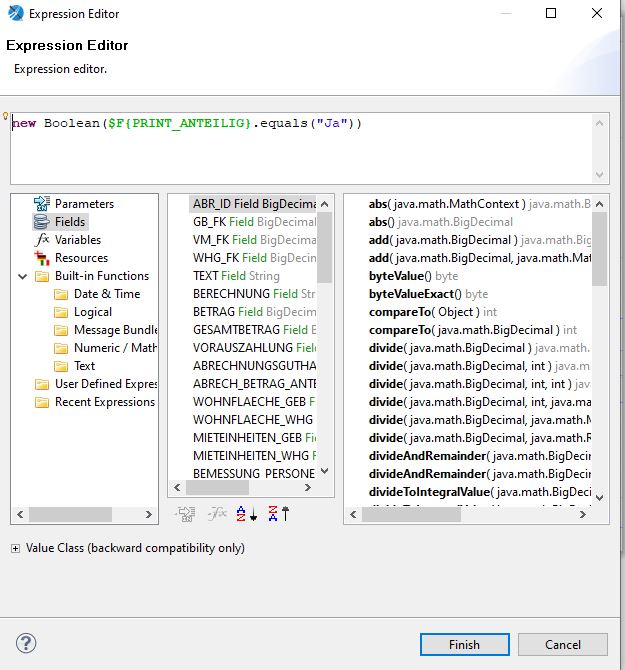
Then I used the "PRINT WHEN EXPRESSION in Jasper Reports Studio for the detail bands B and C (not to the subreport !!!).

You'll find these under Properties --> Appearance ... (click on the edit pencil):


Expression:

new Boolean($F{PRINT_ANTEILIG}.equals("Ja"))

So this I applied to detail band 3 or C

and for detail band 2 or B I put in the expression editor:

new Boolean($F{PRINT_ANTEILIG}.equals("Nein"))


Good luck !!


Montag, 8. Juni 2020

Virtual Hands-on Lab Autonomous Database for APEX Developers June 16+18 2020

Virtual Hands-on Lab Autonomous Database for APEX Developers Part I and II wird es 16 und 18. Jui 2020 geben...

 Moderator: Bo English-Wiczling
Director of Program Management

 You'll learn hands-on how you can extend your APEX applications with new functionality by leveraging the new features that the Autonomous Database brings.
 Think about MACHINE LEARNING (including theory),
geographical visualizations with SPATIAL,
security and self service visualization with ANALYTICS.

 We'll go straight into these exciting topics and you'll be doing a lot of coding yourself in the exercises.

 Participants will get access to an Oracle Cloud account.
 Part I
Scheduled Labs 16th June:
- Lab 100: First steps with ATP
- Lab 200: Add Spatial to your APEX app
- Lab 300: Add Machine Learning to your APEX app

Part 2 Scheduled Labs 18th June:
- Lab 400: Add Security to your APEX app
- Lab 500: Add Analytics to your APEX app

Link zum Hands-on-Lab

 Viel Spaß !!!

Freitag, 24. April 2020

The making of COVID19.ORACLE.COM


COVID19.ORACLE.COM ist ein "Therapeutic learning System" und eine vom Oracle APEX Team entwickelte Anwendung, in der Covid19 infizierte ihr tägliches Wohlbefinden mitteilen können.

Am Anfang der Covid19-Krise in den USA gab es seitens der US Regierung einen Aufruf an alle Firmen, ihr Know How und Resourcen zur Verfügung zu stellen: "As part of a general mobilization of the tech industry to provide apps, tools, and cloud compute capacity,..." (wortlich aus dem ZDNet Artikel) - wie es weiter ging und

Wie es zu der App kam....

Die Story aus dem Munde von Joel Kallman umso beeindruckender - innerhalb der APEX@HOME 24 hour session am 16.4.20.... aufgezeichnet hier (bzgl. des Covid19 Projektes ab Min. 08:30h) - für mich hörte sich dies wie ein guter Krimi an...

Es lohnt sich, das anzuhören....

Als die App fertig war, gab es dann ein Announcement im White House hier.

Demo Video:


Freitag, 10. April 2020

APEX@HOME - 24 hours virtual conference - 24 speakers 16.April 2020

Awesome event - awesome speakers... just join and have fun!!

https://apexatho.me - Start: Do., 16. April 06:00h deutsche Zeit - also: früh aufstehen !!

Recordings will be available via this link.

Our awesome APEX community has gotten together to create a virtual one day conference called APEX@Home! This will be a 24hr event with 24 speakers starting at 00:01 EDT on April 16th going until 23:59 EDT. We will be using the APEX Office Hours platform and Zoom link to host the event.


The format of talks will be 45 min talk (starting on the hour) followed by a 10 min Q&A from participants. We’ll allow a 5 min change over to switch to the next speaker then continue with the next talk.


What do you need to do?


Subscribe at https://apex.oracle.com/officehours so you can receive reminders for this special event.


We’ve created a schedule of all the talks (in APEX of course) that includes calendar links so you can easily add all the talks you want to attend to your calendar.


Pass this info along to all your friends, colleagues, etc. Help spread the word!


A lot of people in the community have stepped up to make this event a success so let’s all #MOCA!


12:00 AM = 06:00h Berlin-Time

Wenn man "Add to calendar" klickt, werden die Termine zu konvertierten Zeit im eigenen Kalender eingetragen ... alles started Donnerstag, 15 April 06:00h - früh aufstehen!!!

Update 16.04.2020 - 08:00h - Start-/End Zeiten sind jetzt DE-Zeiten jetzt:


TitleSpeakerStartEnd
TBDShakeeb Rahman16-APR-2020 06:0016-APR-2020 07:00Add to Calendar
Database Design for APEX Devs in 45minHeli Helskyaho16-APR-2020 07:0016-APR-2020 08:00Add to Calendar
Database Links vs. REST Enabled SQL in APEXAndreea Munteanu16-APR-2020 08:0016-APR-2020 09:00Add to Calendar
Using the PL/SQL DebuggerPhilipp Salvisberg16-APR-2020 09:0016-APR-2020 10:00Add to Calendar
Wizard of ORDSRoel Hartman16-APR-2020 10:0016-APR-2020 11:00Add to Calendar
Know your Browser Dev Tools!Daniel Hochleitner16-APR-2020 11:0016-APR-2020 12:00Add to Calendar
The Ultimate Guide to APEX Plug-insStefan Dobre16-APR-2020 12:0016-APR-2020 13:00Add to Calendar
Keynote / APEX 20.1Joel Kallman / Marc Sewtz16-APR-2020 13:0016-APR-2020 14:00Add to Calendar
A dozen things to do with Oracle APEXScott Wesley16-APR-2020 14:0016-APR-2020 15:00Add to Calendar
Bring the Light into Your Always FREE Autonomous CloudDimitri Gielis16-APR-2020 15:0016-APR-2020 16:00Add to Calendar
Design Principles for Creating “Grrreat” APEX ApplicationsSimon Hunt16-APR-2020 16:0016-APR-2020 17:00Add to Calendar
APEX Debugging 101Peter Raganitsch16-APR-2020 17:0016-APR-2020 18:00Add to Calendar
APEX architecturesNiels de Bruijn16-APR-2020 18:0016-APR-2020 19:00Add to Calendar
Building Single Page Applications in APEXMatt Nolan16-APR-2020 19:0016-APR-2020 20:00Add to Calendar
APEX and the REST of the WorldCarsten Czarski16-APR-2020 20:0016-APR-2020 21:00Add to Calendar
Learning JavaScript Concepts from Real-World SolutionsDan McGhan16-APR-2020 21:0016-APR-2020 22:00Add to Calendar
APEX Security ChecklistScott Spendolini16-APR-2020 22:0016-APR-2020 23:00Add to Calendar
Advanced CSS/JS Techniques to Tweak You Application UIMaxime Tremblay16-APR-2020 23:0016-APR-2020 24:00Add to Calendar
Browser DevTools: The other tool for APEX DevelopmentJorge Rimblas17-APR-2020 00:0017-APR-2020 01:00Add to Calendar
You’ve Got Mail: Tips, Tricks, and Tools for Mail in Application ExpressTimothy St. Hilaire17-APR-2020 01:0017-APR-2020 02:00Add to Calendar
APEX developer's tools of the trade. Applications and tools to aid in application development.Tyson Jouglet17-APR-2020 02:00 PM17-APR-2020 03:00 PMAdd to Calendar
Top 10 tips to optimize APEX for mobileVincent Morneau17-APR-2020 03:0017-APR-2020 04:00Add to Calendar
Social Login while Social DistancingMartin D'Souza17-APR-2020 04:0017-APR-2020 05:00Add to Calendar
Great features of SQLConnor McDonald17-APR-2020 05:0017-APR-2020 06:00Add to Calendar